

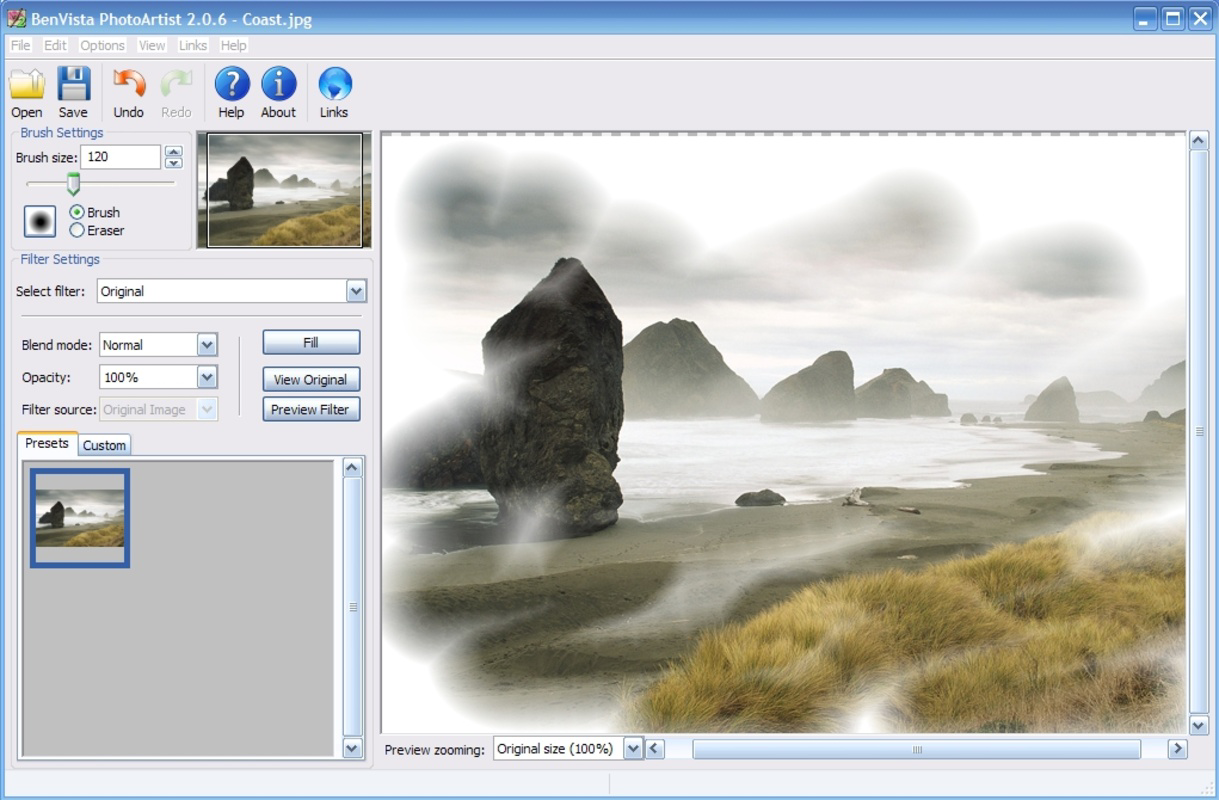
Description
Download PhotoArtist – Photo Editor, Photo Filter, Photo Enhancement, Photo Effects, Photo Artist, Artistic Photo
Overview
PhotoArtist is a dedicated mobile application designed to elevate the quality and artistic appeal of digital photographs. Targeted at photography enthusiasts, casual users, and creative individuals seeking to transform ordinary images into visually striking works of art, the app offers a streamlined experience for photo editing and enhancement. Its primary purpose lies in simplifying the process of applying artistic filters and advanced effects, making it accessible to users across skill levels. Whether editing personal snapshots or crafting content for social media, PhotoArtist provides tools to support creative expression. The app enables users to import images from various sources, including digital cameras, scanners, and local storage, ensuring flexibility in workflow. By integrating intuitive navigation with a wide range of visual effects, PhotoArtist fills a niche in the photography app ecosystem by focusing on artistic transformation over technical precision. Although the developer did not provide additional background on their company or development history, the app’s long-standing presence since its release on July 6, 2009, indicates a stable and enduring user base. The application remains relevant in today’s mobile environment, offering a lightweight solution for users who prioritize ease of use and visual creativity over complex editing features.
Key Features & Functionality
- User-Friendly Interface: The app features an intuitive layout designed to minimize learning curves. Navigation is streamlined, allowing users to access editing tools quickly without needing prior experience. This makes it ideal for beginners while still offering enough depth for intermediate users.
- Extensive Artistic Effects: With a vast library of filters and styles, PhotoArtist allows users to apply unique visual transformations to their photos. Each effect is tailored to evoke a specific artistic mood, from vintage to surreal, enabling users to match their creative vision.
- Multiple Import Options: Users can import images from multiple sources, including hard drives, digital cameras, and scanners. This flexibility ensures that users can work with photos from various devices without compatibility issues.
- Advanced Tools and Effects: The app includes features such as paint mixers and an automatic effect generator, which assist in creating intricate, personalized artwork. These tools support deeper customization, allowing users to experiment with blending styles and generating unique visual outcomes.
- Flexible Output Options: After editing, images can be saved in multiple formats, ensuring compatibility with printing services, social media platforms, and digital archives. This versatility enhances usability across different use cases.
For example, a user preparing a travel photo for Instagram could import a raw image, apply a cinematic filter, fine-tune brightness and contrast, and export it in a high-resolution format suitable for online sharing. Similarly, a hobbyist artist might use the paint mixer to blend two distinct styles, producing a hybrid effect that reflects their personal aesthetic.
Interface, UX & Performance
PhotoArtist presents a clean and organized interface, with tools arranged in logical sections to support efficient workflow. The visual design prioritizes clarity and accessibility, minimizing clutter while maintaining quick access to essential functions. Navigation is consistent across screens, helping users move between import, editing, and export stages with minimal friction. The app’s responsiveness appears to be optimized for basic editing tasks, ensuring smooth transitions between operations such as filter application and image preview. Although the developer did not list formal performance metrics, the app’s file size of 12.2 MB suggests a lightweight footprint, which may contribute to efficient operation on a range of Android devices. Stability during prolonged use has not been detailed, but the app’s long-standing presence indicates a level of reliability. Users can expect minimal lag when applying standard filters or saving images. The app does not appear to require intensive processing power, making it suitable for older or mid-tier smartphones. However, specific requirements for RAM, CPU, or GPU were not disclosed. Overall, the user experience is designed around simplicity and speed, aligning with the app’s focus on artistic expression rather than high-end photo retouching.
Platform Compatibility & Technical Requirements
PhotoArtist is available exclusively on the Android platform. The current version is 2.0.1, with a file size of 12.2 MB, indicating a compact and lightweight installation. The app is free to download and use, making it accessible to a broad audience. While the developer did not specify minimum OS requirements, the app’s release date in 2009 suggests it may support older Android versions. However, compatibility with newer Android releases cannot be confirmed without official documentation. Users should verify device compatibility before installation, especially if using a modern smartphone. The app does not appear to require additional permissions beyond basic storage access, though this was not explicitly stated. No cloud integration, in-app purchases, or subscription models are mentioned. The absence of detailed technical specifications means users should proceed with caution when installing on devices with limited storage or outdated systems.
Pros and Cons
Pros
- Lightweight design at just 12.2 MB, ideal for devices with limited storage.
- Free to download and use with no in-app purchases or ads mentioned.
- Intuitive interface suitable for users of all experience levels.
- Supports multiple image import sources, enhancing workflow flexibility.
- Offers a wide variety of artistic effects for creative expression.
Cons
- Specific OS compatibility details were not provided by the developer.
- No information on update frequency or future development plans.
- Limited documentation on advanced tool functionality.
- May not support the latest Android features or hardware optimizations.
- File size and age suggest potential limitations in modern device integration.
FAQ
Is PhotoArtist safe to download and install?
Yes, the app is free and available through official Android channels. No malware or suspicious behavior has been reported. However, users should ensure they download from trusted sources to maintain device security.
Can I use PhotoArtist on iOS devices?
Currently, the app is only available for Android. There is no official iOS version listed by the developer.
Does PhotoArtist require internet access?
Based on available information, the app functions offline. No cloud sync, online filters, or internet-dependent features are mentioned.
How often is PhotoArtist updated?
The developer did not disclose update frequency. The last known version is 2.0.1, released in 2009, suggesting minimal recent activity.
Can I export my edited photos in high resolution?
Yes, the app supports multiple file formats, which allows for high-quality exports suitable for printing or online sharing. Specific resolution limits were not provided.
Final Thoughts
PhotoArtist remains a noteworthy option for users seeking a simple yet effective tool to enhance their photos with artistic flair. Its lightweight nature, free access, and intuitive design make it a practical choice for casual users and hobbyists who value creativity over advanced technical editing. While the app’s age and lack of recent updates may raise concerns about compatibility with modern devices, its core functionality continues to serve its intended purpose. For individuals looking to quickly apply filters, experiment with visual styles, and share their creations, PhotoArtist delivers consistent value. It stands out in the photography app landscape as a minimalist, no-frills solution focused on artistic transformation. If you're searching for a reliable, free photo editor with a strong emphasis on visual effects and ease of use, this app is worth exploring. Download PhotoArtist now.
Guides & Tutorials for PhotoArtist
How to install PhotoArtist
- Click the Preview / Download button above.
- Once redirected, accept the terms and click Install.
- Wait for the PhotoArtist download to finish on your device.
How to use PhotoArtist
This software is primarily used for its core features described above. Open the app after installation to explore its capabilities.
User Reviews for PhotoArtist 0
No reviews found


